a full list of the variables for ATR volatility breakout

I would like a full list of all the variables for the ATR volatility breakout strategy?
Is it possible to backtest this strategy and if so how
------------------
Submitted from: http://www.indicatorstrategies.com/atr-volatility-breakout-ninjatrader-strategy-autotrader/
Hi Gareth
Thank you for you interest in the MT ATR Volatility Breakout Strategy.
All strategies are 100% free for sim/demo usage to allow you the time to learn without penalty and without rushing.
This strategy trades signaled based on the indicator: MT Signals Trend ATR Breakout - this is the first place to look and understand its concepts.
So its easier to #1 learn how to use the indicator and view its parameters on a chart and note what they do... see which setting appeals and makes sense to you.
Guidance and Videos
1.A Signals Indicators: Please save yourself much time/days weeks even in some cases - view here and watch the videos
https://microtrends.zendesk.com/entries/59737249-Getting-Started-with-MicroTrends-NinjaTrader-Framework-Signals-Indicators
1. B - Also here!! Zone Setting IDs
https://microtrends.zendesk.com/entries/68480125-Zone-Setting-ID-Saving-and-loading-your-own-settings-for-MTNTF7-Indicators-and-strategies

After this you can then look at the strategy version and find the signals indicator parameters also within the strategy parameter list + additional parameters common to all strategies -learn one and you learn them all... All MT Strategies work in the same way and are all based off the MT Signals Indicators and also combine the MT Easy Trader/ Trade Manager UI. To use any MicroTrends NinjaTrader Framework Strategy - you must have followed this route or you will be wasting many days or even weeks/months in some cases - Please verify that you have viewed the following:
2.A Read and Watched about the MT Easy Trader and Strategies
https://microtrends.zendesk.com/entries/53195949-Getting-started-with-MicroTrends-NinjaTrader-Framework-Strategies
2.B Then use your same signals indicators settings within the strategy - which trades the signals from the indicator -so yo
u would essentially just set the indicator signal, order types and trade management within the strategy..etc. and then can run a backtest or optimisation.
Getting Started with MT Signals Trend ATR Volatility Break Out - NinjaTrader indicator
1. Open a chart > click indicators > locate and select "MT Signals Trend ATR Volatility Break Out" > Click New
A. The indicator will appear on the bottom left hand pane - select it > the parameters will appear on the top right panel
B Focus on the main parameter groups "Basic Indicator Parameters", "Signals Trade Setup", "Signals Trade Entry", "System Session times"
Signals Indicator ParameterChecklist
Param Groups:"Indicator Settings Storage" - Set "MT -Zone Setting ID"=0
Param Groups:"Signals Trade Setup" - Make sure "Trade Setup mode">=1 or some other value in order to get signals e.g >0
Param Groups:"System Session Times" - Set "session mode" = 0 - to allow 24/7 signals
Click Ok
Add to chart 
View trend color graphics parameters

View signal color graphics parameters 
NinjaTrader: Automated Trading Strategy
Getting Started with MT ATR Breakout NinjaTrader Strategy -1

Add to a chart
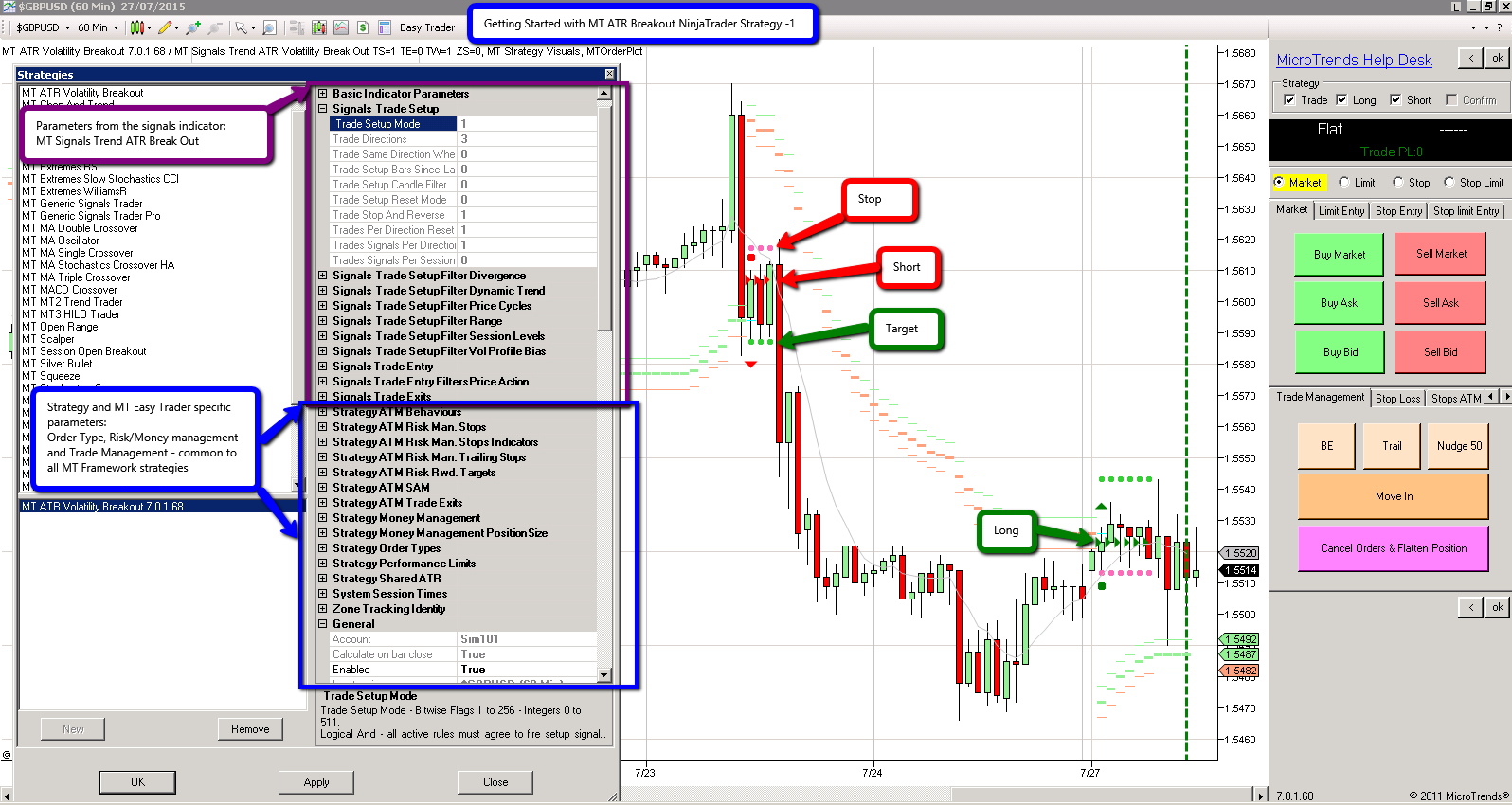
Open New Blank Chart > Default 24/7 > Cl or Forex or Stocks etc
Chart Right Click > Strategies > select MT ATR Volatility Breakout > Click New
In the top right handside you will see all the Parameters:
To see all public parameters for a strategy - you can view them in the strategy list.
from within NinjaTrader:
1. Chart > Strategy Menu > Strategy List
2 Control Center Strategy tab > Strategy Menu > Strategy List
3. Strategy Analyzer > Strategy Menu > Strategy List
BackTesting
1. Visually on a chart - Add a strategy to a chart and view the historical trades and performance stats
Right click the chart > Strategy Performance > MT ATR Volatility Breakout > Historical> View the Report 
2. Backtest using the Strategy Analyzer - using the Strategy Analyzer and run a backtest from your selected/chosen strategy and datatime series/instrument 
NinjaTrader BACK TEST & Optimisation TIPS
1. Use plain vanilla to start
A. remove all filters
B. put stops out to around 25 to 25 ticks
C. remove all targets, all breakeven, all trail stops
see what the natural strategy profile does -just by stopping and reversing...
2. Plain Vanilla + some profit taking techniques
A. next decide on an ATR Trail stop for example and then view this
B.next add a target
C. Add an Exit
D. Add a session time -
etc
There is quite a lot to absorb above:
Please let me know if you have further questions
Many thanks
Tom
MicroTrends Support
support@microtrends.co
http://www.microtrends.co/support/
Tip! You can visit the help desk forum to see previous answered frequently asked questions:
http://microtrends.zendesk.com/forums
Please sign in to leave a comment.
Comments
0 comments